x360 Cloud Backup: Protect Microsoft 365 & Google Workspace
The Ultimate Guide to x360 Cloud Backup: Securing Microsoft 365 and Google Workspace Against Data Loss
Every day, thousands of businesses migrate their operations entirely to public cloud infrastructure. They rely on platforms like Microsoft 365 and Google Workspace to host critical emails, build internal collaborative networks on SharePoint and Teams, and house their proprietary operational intelligence within cloud drives.
However, a dangerous misconception exists among business owners, IT directors, and operations managers: the belief that Microsoft and Google automatically back up your business data.
They do not.
Under the tech industry's universal Shared Responsibility Model, public cloud giants guarantee the availability of their infrastructure, data centers, and web applications—but you remain solely responsible for the protection, retention, and recovery of the actual data living inside those applications. Without an enterprise-grade third-party backup architecture like x360 Cloud Backup, your critical business files are surprisingly vulnerable to accidental deletion, internal malicious actors, malicious encryption, and sophisticated email spoofing campaigns.
At Heartfelt IT, we specialize in implementing rock-solid, automated backup frameworks that close this critical security gap entirely.
The Hidden Gaps in Native Cloud Storage
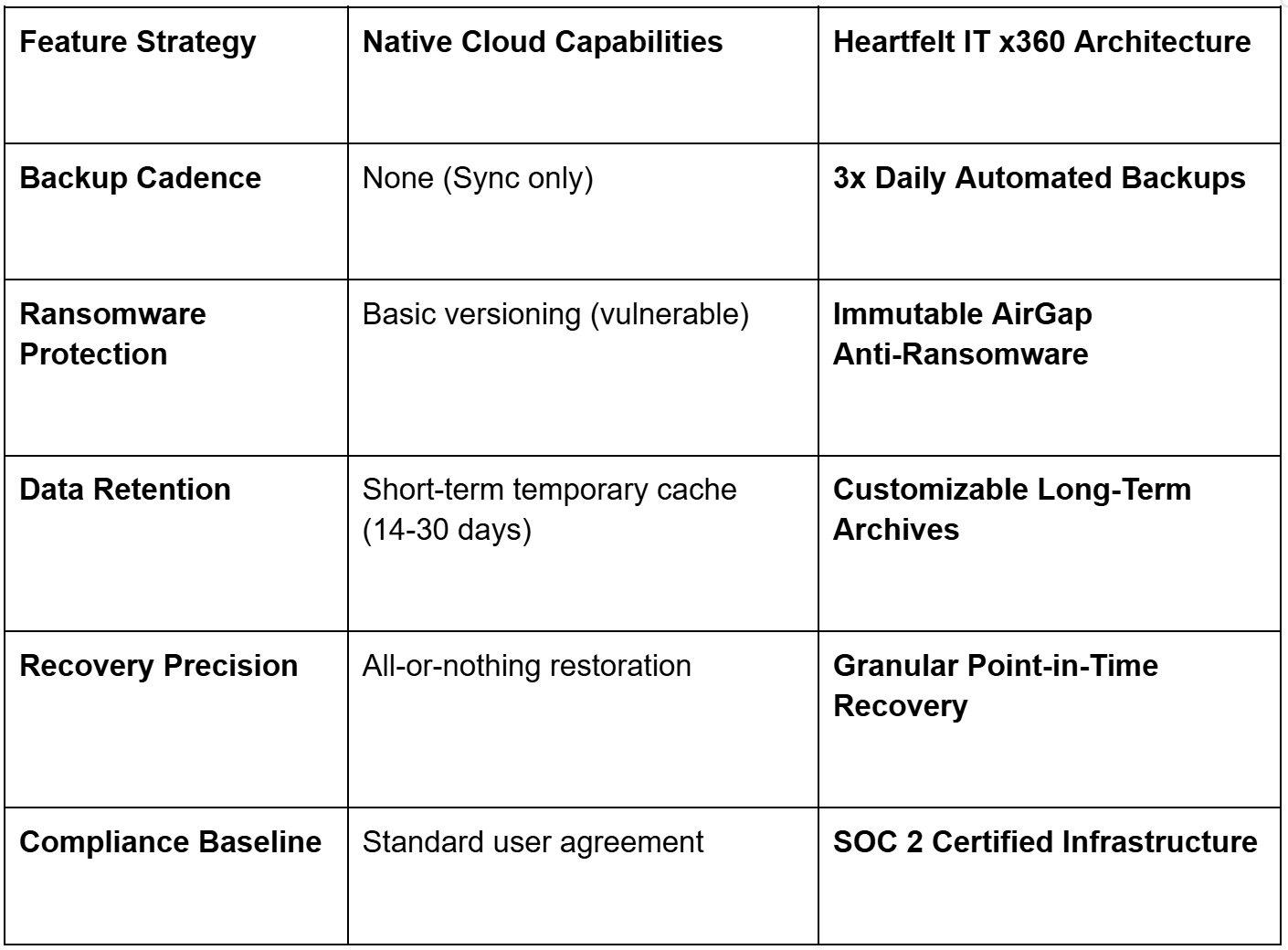
If an employee accidentally permanently deletes an entire client subfolder in Google Drive or a vital historical channel in Microsoft Teams, native retention policies usually purge that information forever within 14 to 30 days. If a rogue employee purposefully wipes their mailbox before leaving the organization, that institutional knowledge vanishes into the ether.
Worse yet, public cloud accounts are now primary targets for modern cybercriminals. Standard cloud synchronization applications are designed to update instantly—meaning if ransomware encrypts files on a local desktop computer, those corrupted, unreadable files are immediately synchronized directly into SharePoint or Google Drive, completely locking out your organization.
Our x360 Cloud Backup framework completely neutralizes these threats through automated, persistent, and immutable data protection.

How the x360 Cloud Backup System Works
Our cloud protection suite works quietly in the background, creating comprehensive point-in-time recovery baselines without slowing down your team's day-to-day work.
1. Comprehensive 3x Daily Automated Backups
We don't rely on a single daily snapshot. Our platform performs three automated backups every single day for both Microsoft 365 and Google Workspace environments. This aggressive cadence shrinks your Recovery Point Objective (RPO) down to just a matter of hours, ensuring that if a data loss event occurs, you only lose a morning's worth of work rather than weeks of progress.
Our system backs up every key component of your digital workspace:
Emails & Contacts: Full preservation of Outlook exchange and Gmail environments.
Drive Files: Total protection for OneDrive folders and Google Drive repositories.
Collaboration Spaces: Complete backup tracking for SharePoint document libraries and Microsoft Teams channels, protecting the structure and files of your cross-functional projects.
2. AirGap Anti-Ransomware Technology
The cornerstone of our security framework is proprietary AirGap anti-ransomware technology. Traditional backups that are continuously connected to your network can be targeted, altered, or deleted by sophisticated malware during an active cyberattack.
AirGap technology creates a physical and logical separation between your active production environment and your storage vaults. The system automatically traps incoming backup data, validates its integrity, and then places it into an immutable archive that cannot be deleted, manipulated, or encrypted by external forces or unauthorized users. Even if ransomware bypasses your local firewall, your backup snapshots remain completely safe and instantly available for deployment.
3. Advanced Full-Text Email Search & Long-Term Retention
Compliance regulations require many modern businesses to store financial communications, legal records, and operational emails for multiple years. Our system delivers robust long-term retention capabilities that satisfy strict corporate governance policies.
To prevent data discovery from turning into a tedious manual chore, we provide a lightning-fast full-text email search engine. Administrative teams can query terms across thousands of archived corporate mailboxes instantly, locating specific historical messages, attachments, or agreements within seconds.
Enterprise Compliance and Email Spoofing Defense
SOC 2 Certified Architecture
Data protection requires maximum transparency. The infrastructure backing our x360 system maintains SOC 2 certification. This rigorous independent audit confirms that our data transmission methods, storage protocols, and operational security controls meet the absolute highest standards for cloud security, confidentiality, and data privacy compliance.
DNS & Policy Management for Spoofing Protection
Data protection involves more than just backing up files; it requires securing the channels where data travels. Malicious actors frequently attempt to trick your clients and partners by spoofing your company’s email domain names.
Heartfelt IT integrates advanced DNS and policy management directly into your cloud posture. By configuring robust authentication protocols—including SPF (Sender Policy Framework), DKIM (DomainKeys Identified Mail), and DMARC (Domain-based Message Authentication, Reporting, and Conformance)—we block unauthorized servers from sending fraudulent emails from your domain, preserving your brand's integrity and shielding your network from inbound phishing threats.
Why Enterprise Backup Matters to Your Bottom Line
A catastrophic data loss event does more than cause immediate technical headaches; it introduces massive financial liabilities, regulatory penalties, and reputational damage.
Frequently Asked Questions
Doesn't Microsoft 365 include built-in backup tools?
No. Microsoft provides infrastructure uptime and temporary recycle bin storage, but they explicitly state in their services agreement that businesses should use third-party applications to protect their data from corruption or deletion.
What exactly makes an AirGap backup immutable?
Immutability means the data cannot be changed. Once a backup is successfully written to the AirGap vault, the system strips away all write and delete permissions for a set retention period. Even a hacker who steals admin credentials cannot wipe those files out.
Can you restore a single file, or do you have to restore the entire system?
Our platform features granular point-in-time recovery. If you accidentally lose a single email or a specific presentation file, we can isolate and restore that individual asset without touching the rest of your live environment.
Interested to learn more about X360 Cloud Backup? Click here: https://heartfeltit.com/itconcierge