Smart PC Refresh & Computer Lifecycle Management
In the modern operational ecosystem, workstations, laptops, and local terminals serve as the literal backbone of your daily production. Whether your team is processing client transactions, updating databases, or coordinating community outreach programs across Ontario, the reliability of your hardware directly impacts your bottom line.
However, as organizations scale, managing physical hardware assets often shifts from a structured strategy to reactive firefighting. Workstations are left running past their natural operational limits, warranties expire unnoticed, and unexpected machine breakdowns derail staff workflows.
True operational efficiency requires moving past a reactive "break-fix" model. Implementing a structured Computer Lifecycle Management framework ensures your team remains equipped with optimized, secure tools while keeping technological expenses flat and predictable.
At Heartfelt IT, we remove the logistical burdens of technical upgrades. We offer a transparent, comprehensive blueprint designed to track, maintain, and replace your office hardware seamlessly.
The Core Components of Strategic Hardware Optimization
An effective corporate hardware strategy relies on continuous tracking and proactive logistical scheduling. By structuring how assets are managed from initial deployment to final retirement, organizations eliminate unexpected capital strains and maintain operational continuity.
1. Comprehensive Computer Inventory Management
You cannot manage what you do not track. Many offices operate with a blind spot regarding their actual hardware footprint, leaving them unsure of exactly how many laptops are deployed, who is using them, or where spare units are stored. Our structured Computer Inventory Management system logs every physical asset across your network. This real-time visibility allows leadership teams to instantly verify device allocations, optimize hardware configurations, and track the physical health of every workstation across multiple departments or branch locations.
2. Data-Driven Replacement Planning
Waiting for an employee's computer to experience a catastrophic hard drive or motherboard failure before ordering a replacement is an expensive, inefficient operational habit. It leads to urgent, high-priced shipping fees, lost productivity, and administrative friction. Proactive Replacement Planning uses historical deployment timelines and performance indicators to accurately project when a machine will reach its natural end-of-life boundary. This allows your leadership team to schedule device upgrades incrementally, ensuring technical equipment refreshes fit seamlessly into your annual fiscal budgeting.
3. Maximizing Value with Computer Warranty Management
When hardware issues inevitably surface, fixing them out-of-pocket while a manufacturer's protection plan is still active is an unnecessary drain on corporate cash flow. Specialized Computer Warranty Management monitors the coverage windows of every desktop, server, and laptop across your infrastructure. If a component fails within its covered lifecycle, our tracking systems flag the coverage status automatically, allowing your team to easily claim official parts and service alternatives without incurring unexpected repair costs.
[Inventory Asset Mapping] ➔ [Warranty & Software Auditing] ➔ [Proactive Replacement Planning] ➔ [Free Labour Deployment] ➔ [Secure Sanitization & Donation]
Streamlining System Deployments and Asset Tracking
Updating hardware involves more than just unboxing new equipment; it requires configuring systems correctly and verifying that underlying software permissions match your regulatory and operational requirements.
4. Auditing Your Installed Software Inventory
A hardware refresh provides the perfect opportunity to clean up your digital environment. Before migrating data to a new computer, conducting a meticulous Installed Software Inventory is essential. This audit profiles every operating system, local application, and background utility running across your workstations. It highlights outdated program versions that pose security vulnerabilities and uncovers forgotten, redundant software subscriptions. Aligning your software footprint during a hardware refresh ensures your new machines remain lean, secure, and fully compliant with software licensing guidelines.
5. Reducing Overhead via Free Computer Replacement Labour
The single largest hurdle preventing organizations from executing vital hardware upgrades is the high cost of configuration and deployment labour. Having an external technical team manually clone drives, configure user profiles, map local network printers, and install necessary corporate applications can rapidly double your procurement budget. To eliminate this financial barrier and keep upgrades accessible, Heartfelt IT includes Free Computer Replacement Labour within our managed service architecture. We handle the entire engineering, deployment, and configuration workload, allowing your organization to refresh its fleet without facing unexpected service fees.
Responsible Asset Decommissioning: Security and Corporate Stewardship
The hardware lifecycle does not simply end when a machine is unplugged from an employee's desk. The final decommissioning phase requires absolute security oversight and responsible environmental practices.
6. Enforcing Old Computer Data Sanitization
Simply dropping a retired office computer into a standard recycling bin or deleting user profiles manually leaves your proprietary company data incredibly vulnerable. Erased storage sectors can easily be reconstructed using basic, publicly available recovery software, exposing old client lists, accounting data, and internal emails. Guarding your perimeter requires military-grade Old Computer Data Sanitization. We utilize certified software overwrite patterns to permanently scrub hard drives and solid-state disks, rendering the underlying storage completely unreadable and legally compliant with data privacy expectations.
7. Community Impact Through Old Computer Donation
Once a workstation has been completely sanitized and cleared of all corporate footprints, it frequently still possesses valuable utility for community programs, learning centers, or local charities. Our Old Computer Donation initiatives redirect your securely wiped, functional hardware directly to organizations in need. This sustainable lifecycle loop gives your old technology a second life, reduces corporate electronic waste footprint, and supports local community development.
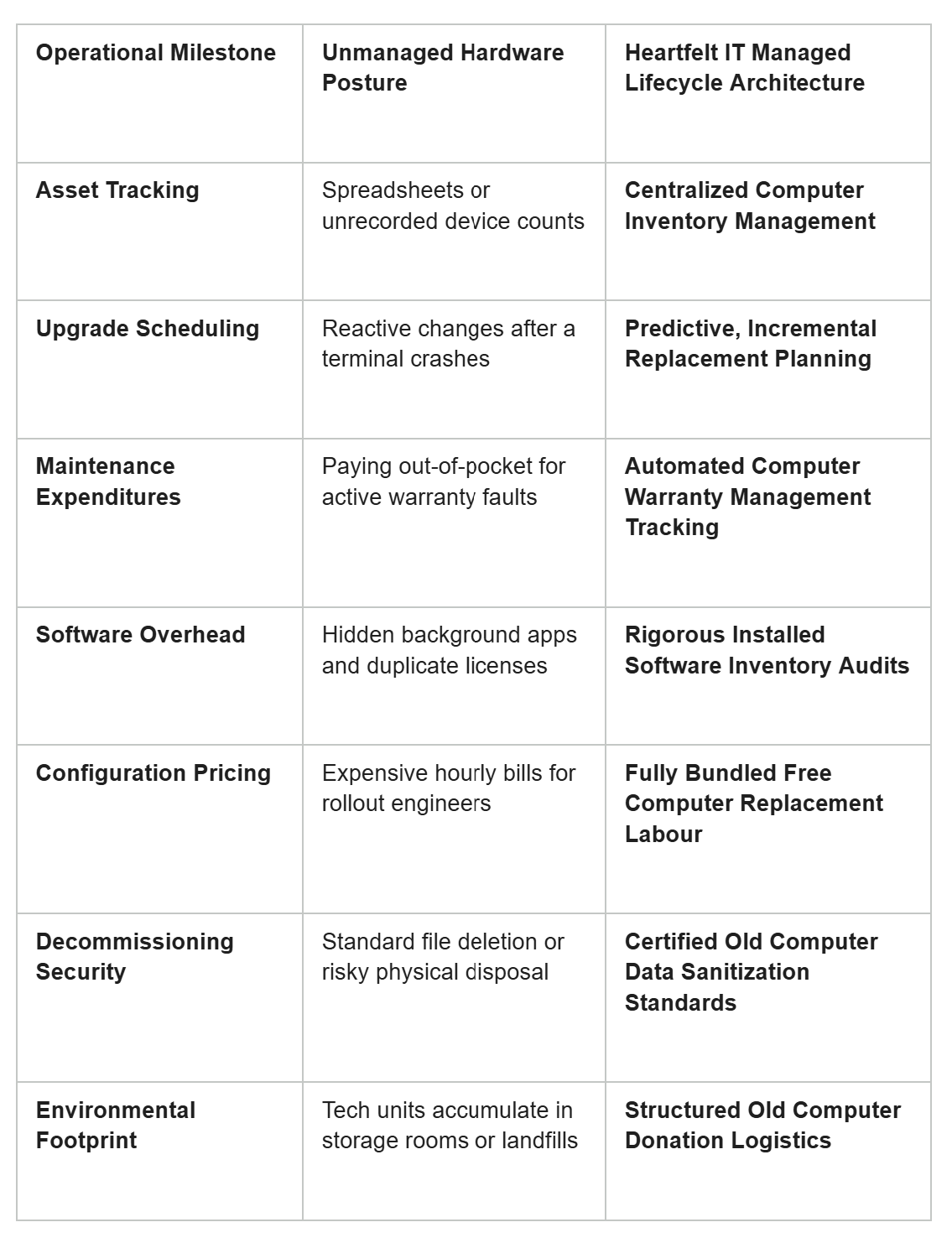
Technical Breakdown of Lifecycle Models
Frequently Asked Questions
How does the free computer replacement labour framework save our team money?
Instead of billing your business or nonprofit an extra hourly service fee to set up every new computer, configure employee profiles, install applications, and transfer old files, we bundle the migration under our standard service agreement. This eliminates hidden onboarding fees and makes upgrading your systems completely affordable.
What standard is utilized for old computer data sanitization?
We use industrial, multi-pass data overwrite protocols that completely overwrite every sector of the storage drive. This processes data destruction to a level that ensures old client histories, passwords, and private files can never be extracted or recovered by third-party data discovery software.
Interested to learn more about Smart PC Refresh? Click here: https://heartfeltit.com/itconcierge