Navigating PHIPA & PIPEDA: Secure Clinical Communications
Within the Canadian medical infrastructure, the management and transmission of patient information demands absolute adherence to provincial and federal privacy frameworks. For medical clinics, private practitioners, and healthcare spaces operating throughout Ontario, communication systems handle a constant stream of sensitive data points every single day.
Every message containing patient names, personal email addresses, home addresses, phone numbers, appointment calendars, or scheduling times falls under strict legislative oversight. Furthermore, intake forms, downloaded PDFs, initial medical history submissions, diagnostic notes, treatment plans, and laboratory results require specialized structural safeguards to ensure total privacy.
Failing to properly configure these channels poses an immediate threat to your operation. To maintain complete security and fulfill your obligations under Ontario’s Personal Health Information Protection Act (PHIPA) and Canada’s federal Personal Information Protection and Electronic Documents Act (PIPEDA), your clinic must implement an explicit, verified technical posture.
At Heartfelt IT, we break down the exact realities of secure data transmission, giving your team the definitive blueprint to align your clinical communication networks with Canadian law.
The Baseline Requirement: Building the Auditable Human Firewall
Compliance cannot be achieved simply by installing software; it demands clear structural policies inside your organization. Your clinic is legally required to establish a formal Internal Information Practices Document. This corporate policy must explicitly define what counts as protected data, how files must be handled, and the strict protocols for sending information.
The Mandatory Staff Affirmation Rule
Having a policy document sitting in a drawer is not enough to satisfy regulators. This operational guideline carries a mandatory rule: The Internal Information Practices Document must be physically or digitally signed by every single employee, receptionist, independent practitioner, and contractor immediately upon hire. Furthermore, this documentation must be re-evaluated and resigned during mandatory annual training sessions. This systematic protocol creates an auditable "human firewall," providing clear, documentable proof to provincial and federal privacy regulators that your clinic actively manages its compliance obligations.

Communication Channels Ranked by Cybersecurity Security Level
Not all technology solutions are built equally. To help practitioners understand their vulnerabilities, we have analyzed and ranked the most common clinical communication systems from the highest cybersecurity security level to the lowest.
[Level 1: Integrated EMR Apps] ➔ [Level 2: Configured Cloud M365/Google] ➔ [Level 3: Encrypted PDFs] ➔ [Level 4: Limited SMS/VoIP]
Level 1: Integrated EMR Application Environments (The Gold Standard)
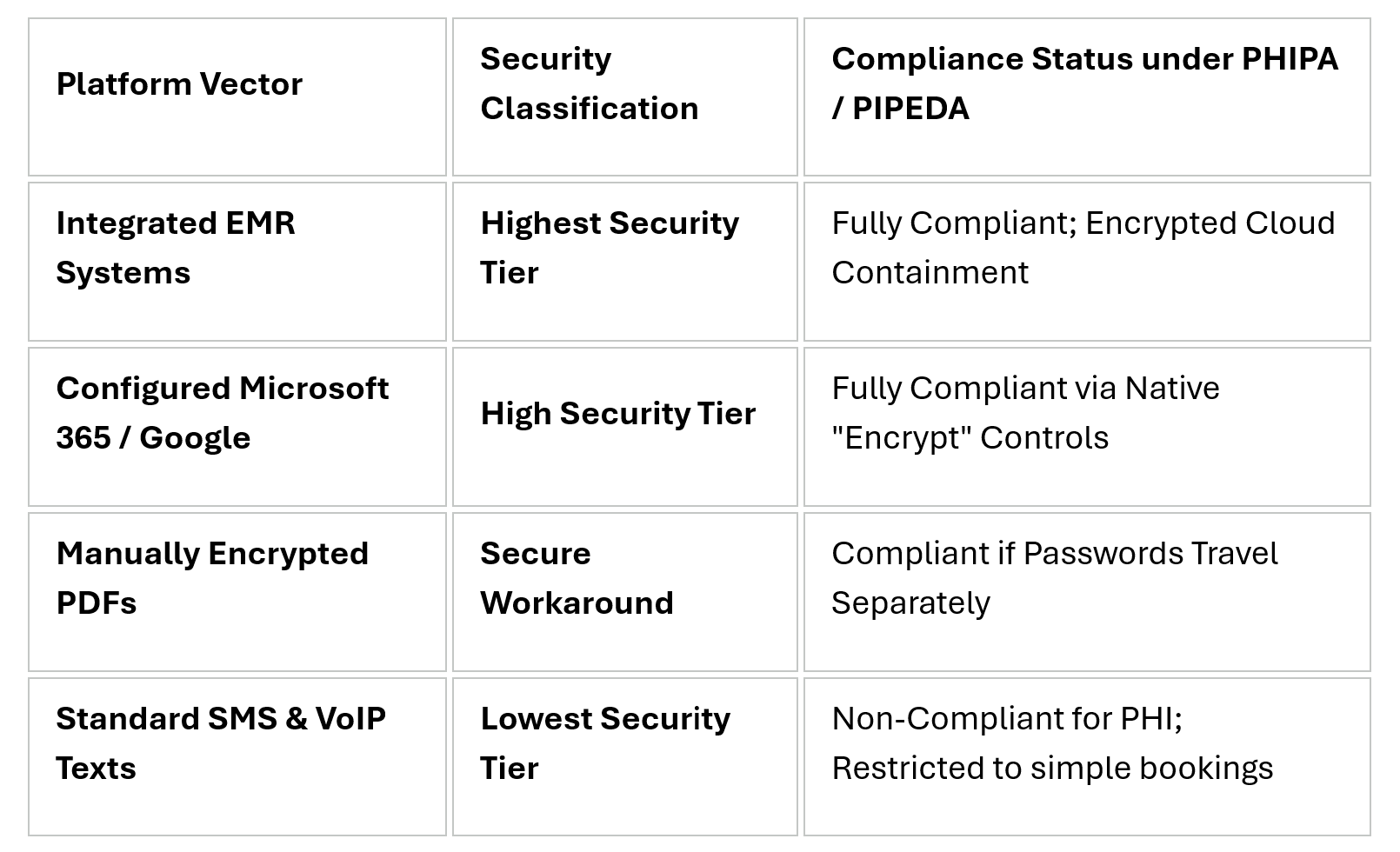
Integrated practice management systems (like Jane App, Cliniko, or Juno EMR) provide the safest possible communication ecosystem for Canadian healthcare. The core reason why this architecture works perfectly is that data packets do not float freely across the open web. Instead, all patient messages, histories, and intake logs remain fully contained inside a secure, encrypted cloud database environment.
These native application frameworks allow practitioners to message clients seamlessly on smartphones while preventing any local device storage or personal photo libraries from caching sensitive medical documents.
Level 2: Hardened Microsoft 365 or Google Workspace Environments
Professional cloud platforms configured with native inbox encryption tools provide a highly dependable, compliant communication pipeline. For example, a hardened Microsoft 365 email layout makes compliant messaging seamless. Before sending an outbound message containing patient indicators, staff can select the built-in "Encrypt" or "Do Not Forward" utility right inside the native Outlook window.
For advanced security, configuring specialized enterprise tiers unlocks deep S/MIME cryptographic encryption controls. This enables clinic administrators to enforce Confidential Mode, which sets automated expiration dates on outbound text and completely blocks the recipient's ability to forward, copy, or print the text.
Level 3: Manually Encrypted PDFs (The Safe Email Workaround)
When a clinic lacks an integrated portal or an enterprise-grade cloud environment but must transmit medical histories or intake forms over standard email networks, manually encrypted PDFs are a secure alternative. By utilizing licensed document software, staff can lock individual file attachments with a distinct, complex password. To remain fully compliant, this local access password must be shared with the receiving party via a completely separate channel (such as a direct telephone call), ensuring the document remains safe even if the email path is intercepted.
Level 4: SMS & VoIP Telecommunication Channels (The High-Risk Zone)
Standard text messages are completely unencrypted, stored in plain text by telecom providers, visible on phone lock screens, and lack granular user audit logs. Because of these distinct flaws, SMS and VoIP text messaging must be strictly restricted to simple booking notifications. They must never contain clinical details, symptom updates, or diagnostic observations.
Securing Third-Party Insurer Communications: Three Strict Rules
Exchanging data with external insurance adjusters represents one of the most common vectors for accidental privacy leaks. To protect your clinic from severe penalties, enforce these three strict communication pathways when dealing with third-party insurers:
Mandatory Express Consent: Never release an ounce of data to an insurance adjuster without an explicit, physically or digitally signed authorization form from the patient.
Forced Encryption Links: If an adjuster requests files via standard email, refuse to send them as open, unencrypted attachments. Instead, utilize your Microsoft 365 Encryption Portal or Google Confidential Mode to send a secure, access-controlled link, forcing the insurance adjuster to authenticate their identity before downloading the records.
Secure Cloud e-Fax Gateways: Insurance companies remain deeply reliant on legacy fax machines due to old legal exemptions. If an insurer insists on a fax transmission, do not use a standard, unencrypted desktop fax machine where documents sit out in an open office. Use a professional, cloud-based e-Fax provider configured to keep data completely encrypted, paperless, and anchored inside Canadian data centers.
Technical Breakdown of Clinical Communication Safeguards
Frequently Asked Questions
Can our clinic use traditional desktop fax machines to send patient notes to insurers?
Traditional desktop fax machines are discouraged because printed pages often sit out in open, shared office spaces where unauthorized staff or visitors can view them. Secure cloud e-fax systems are preferred because they keep transmissions digital, fully encrypted, and anchored inside secure data environments.
What happens if a new staff member forgets to sign the Internal Information Practices Document?
Failing to secure a signature immediately creates a critical compliance gap. Regulators require an unbroken, auditable trail proving that every single employee and contractor has been formally bound to your clinic’s privacy protocols from their very first day of work.
Interested to Learn more about PHIPA & PIPEDA Compliance? Click here: https://heartfeltit.com/healthcare-communications