
Navigating PHIPA and PIPEDA:
The Truth About Secure Communication for Clinics
What Information Needs to Be Protected under PHIPA and PIPEDA?
A common compliance pitfall is assuming that privacy laws only apply to formal, typed medical charts. Under Ontario’s Personal Health Information Protection Act (PHIPA) and the federal Personal Information Protection and Electronic Documents Act (PIPEDA), Personal Health Information (PHI) encompasses any piece of data that connects a patient’s identity to their past, present, or future healthcare.
To maintain strict compliance, your clinic must apply maximum technical protection to:
Patient names, personal email addresses, home addresses, and phone numbers.
Appointment calendars, scheduling times, and appointment types.
Intake forms, downloaded PDFs, and initial medical history submissions.
Diagnostic notes, treatment plans, and laboratory results.
Invoices, payment receipts, financial records, and insurance claim tracking sheets.

If an intercepted email contains only a patient’s name and a billing receipt for a specialized psychology or oncology clinic, that exposure is considered a reportable data breach under Canadian law.

The Foundation of Compliance: The Internal Staff Privacy Agreement
Software and encryption tools are useless if your team is not aligned on privacy practices. Before configuring a single communication platform, your clinic must address the human factor of cybersecurity.
Your clinic is legally required to establish a formal Internal Information Practices Document. This corporate policy must explicitly define what counts as protected data, how files must be handled, and the strict protocols for sending information.
Mandatory Rule: This document must be physically or digitally signed by every single employee, receptionist, independent practitioner, and contractor immediately upon hire, and re-evaluated during mandatory annual training. This creates an auditable "human firewall" that demonstrates to provincial and federal regulators that your clinic actively manages its compliance obligations.
Communication Channels Ranked by Cybersecurity Security Level
Not all digital tools are safe for handling medical data. Here is the reality of modern communication systems, ranked from highest cybersecurity security level to lowest

EMR Application
Fully encrypted systems that keep patient communications.
Microsoft 365 / Google Workspace environment
Professional cloud platforms configured with native inbox encryption tools
Manually encrypted PDFs
A secure workaround using licensed software to lock individual file attachments
SMS & VoIP
An unencrypted channel lacking user audit trails that must be strictly limited
Closed EMR Applications & Patient Portals (Highest Security)
Integrated practice management systems (like Jane App, Cliniko, or Juno EMR) provide the safest possible communication ecosystem for Canadian healthcare.
Why it works: Messages do not float across the open web. Instead, they remain contained inside a secure, encrypted cloud database environment. The software automatically tracks user access, providing an immutable audit trail.
The Mobile Advantage: Many premium EMRs offer dedicated, secure mobile apps. These allow practitioners to message clients seamlessly on smartphones while preventing any local device storage or personal photo libraries from caching sensitive medical documents.

Hardened Microsoft 365 Email Environment
When deployed with a proper business configuration (such as Microsoft 365 Business Premium), Microsoft automatically pins data at rest inside secure Canadian data center regions (Toronto and Quebec City).
How to send encrypted emails
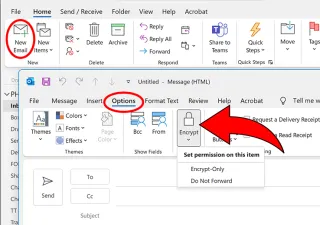
Microsoft 365 makes compliant communication seamless. Before sending a message containing PHI, staff can select the built-in "Encrypt" or "Do Not Forward" utility right inside Outlook. This forces the recipient to verify their identity through a one-time code or secure login before they can read the contents or download attachments.
Google Workspace
While Google Workspace is highly collaborative, it features an architectural limitation that requires operational workarounds for Canadian clinics.
The USA Catch
Google Workspace does not offer an option to isolate and lock data exclusively within Canada. Even on Enterprise plans, data-fencing configurations are restricted to the US or Europe. Because emails and user data will be routed and stored across international borders, your clinic must obtain an explicit, signed Data Residency Consent Form from the patient during onboarding before using Google to communicate.
How to send encrypted emails
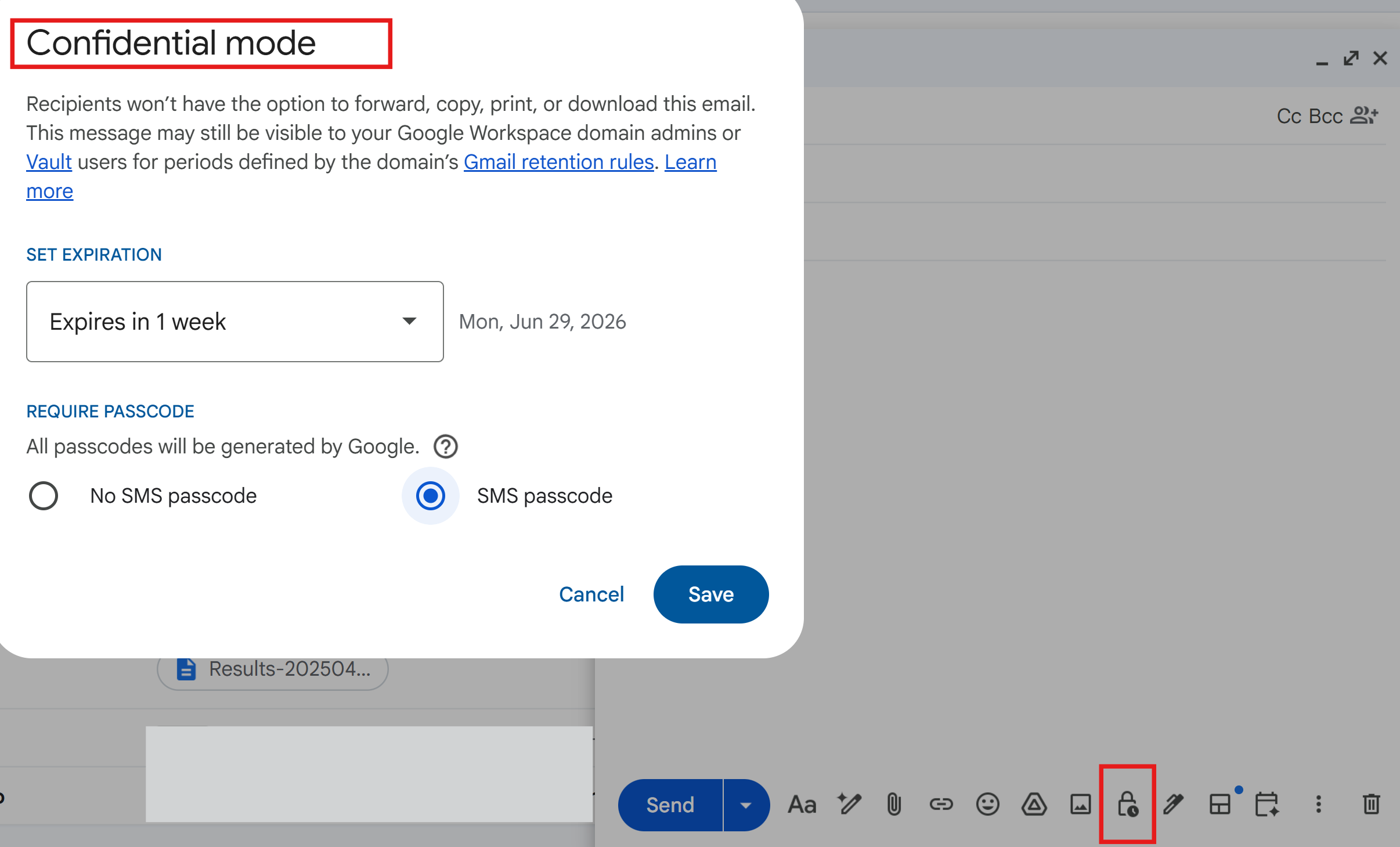
To send encrypted data natively in Google Workspace, practices must use an Enterprise Standard subscription. This tier unlocks advanced S/MIME encryption controls and allows administrators to use Confidential Mode, which sets automated expiration dates on emails and blocks the patient's ability to forward, copy, or print the text.
Manually Encrypted PDFs - email workaround
If your clinic operates on a basic, legacy email system that completely lacks native inbox encryption, your only compliant alternative is to secure the file itself.
How it works
Practitioners can use a paid, licensed copy of Adobe Acrobat Pro to lock sensitive records, intake charts, or invoices with a strong password before attaching them to a standard email. Note, the Adobe Acrobat Pro license costs around $26 / month, so it makes sense to purchase it only if you need it for some other tasks too.
The Golden Rule
You must never send the file password in the same email as the file. The password must be communicated to the patient through an entirely separate pathway, such as a phone call or a text message.

SMS Services from Local Canadian VoIP Providers (Lowest Security)
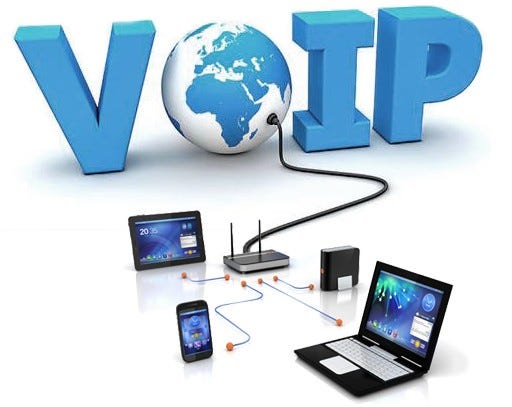
Using local Canadian Voice-over-IP (VoIP) platforms to text patients is incredibly convenient, but it resides at the bottom of the security ladder.
The Pros
Local VoIP text messages route data through Canadian infrastructure, have excellent open rates, and are ideal for quick logistical updates.
The Cons
Standard text messages are completely unencrypted, stored in plain text by telecom providers, visible on phone lock screens, and lack granular audit logs. VoIP text messaging must be restricted to simple booking notifications and must never contain clinical details, symptom updates, or diagnostic observations.

The Harsh Reality of Communicating with Insurance Companies
One of the most dangerous daily activities for a clinic is sharing medical records with insurance providers.
In reality, insurance adjusters frequently call or email small practices demanding "the complete patient chart" or clinical notes for an audit, often asking you to simply "reply to this email with the attachments."
This is a massive compliance trap. Under PHIPA and PIPEDA, insurance companies reside completely outside the patient's "Circle of Care." As the Health Information Custodian, you hold ultimate legal liability for how that data travels. If you reply to an adjuster with an unencrypted PDF over the open web, your clinic is responsible for the resulting privacy breach, regardless of who requested the files.
The Protocol for Safe Insurance Interchanges
To protect your clinic from severe penalties, enforce these three strict communication pathways when dealing with third-party insurers:
Mandatory Express Consent
Never release an ounce of data to an insurance adjuster without an explicit, signed authorization form from the patient.Forced Encryption Links
If an adjuster requests files via standard email, refuse to send them as open attachments. Instead, utilize your Microsoft 365 Encryption Portal or Google Confidential Mode to send a secure, access-controlled link. Force the insurance adjuster to authenticate their identity before downloading the records.Secure Cloud e-Fax Gateways: Insurance companies remain deeply reliant on legacy fax machines due to old legal exemptions. If an insurer insists on a fax transmission, do not use a standard, unencrypted desktop fax machine where documents sit out in an open office. Use a professional, cloud-based e-Fax provider configured to keep data completely encrypted, paperless, and anchored inside Canadian data centers.
CONCLUSION
Achieving perfect PHIPA and PIPEDA compliance doesn't mean making your clinic impossible to run. It simply means setting up predictable technical guardrails that protect your business, your practitioners, and your patients silently in the background.
At Heartfelt IT, we specialize in auditing clinic networks, hardening email ecosystems, and deploying airtight security stacks designed for modern Canadian healthcare providers.
Let’s Check Your Clinic's Digital Health Pulse
Take the guesswork out of your practice's technical security, data pathways, and privacy alignment. Contact our team at Heartfelt IT to schedule a complimentary, plain-language practice setup review.
We will help you identify hidden security vulnerabilities, map your current cloud data location, and construct a predictable technical roadmap designed to protect your patients and your practice silently in the background.


Subscribe to our Newsletter!
Subscribe to our weekly newsletter to receive simple, actionable advice on PHIPA, PIPEDA, and core Cybersecurity strategies specifically tailored for small healthcare businesses and clinics.

Accessible technology solutions, assessments, planning, and cloud computing for nonprofits across North America. We understand limited budgets and IT expertise, and offer help through grant writing, consulting and tech support.
Services
Resources
About
Contact
Socials


Copyright © 2025, Heartfelt IT